
Record an expense and choose "Paid from"
3-minute read · Last updated 3 November 2026
Record a cost you have already paid, choose the cash or bank account it was paid from, and attach the receipt.
Before you start
- Your role must allow you to manage expenses. The Owner, Admin and Accountant roles can.
- Use an expense for something already paid, such as a fuel receipt or a card payment. For a supplier invoice you will pay later, see Enter a supplier bill.
- The bank or cash account that paid should already be set up. See Bank accounts.
- Have the receipt ready as a PDF or photo so you can attach it.
Steps
- Go to Purchases › Expenses.
- Click New expense.
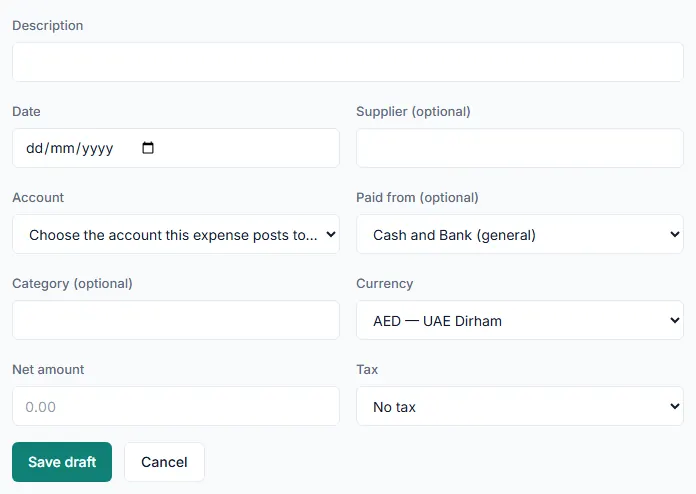
- Type a Description, for example "Office printer paper".
- Enter the Date you paid.
- Type the Supplier (optional) name if you want it on the record.
- In Account, choose the account this expense posts to. Prepayments and fixed assets are listed under Assets (prepayments, fixed assets).
- In Paid from, choose the cash or bank account the money left.
- Type a Category (optional) if you use categories.
- Check the Currency. If it is not AED, type the Exchange rate for 1 unit of that currency in AED.
- Enter the Net amount, before VAT.
- In Tax, choose the tax code on the receipt, or No tax.
- Click Save draft. The expense opens with the status Draft.
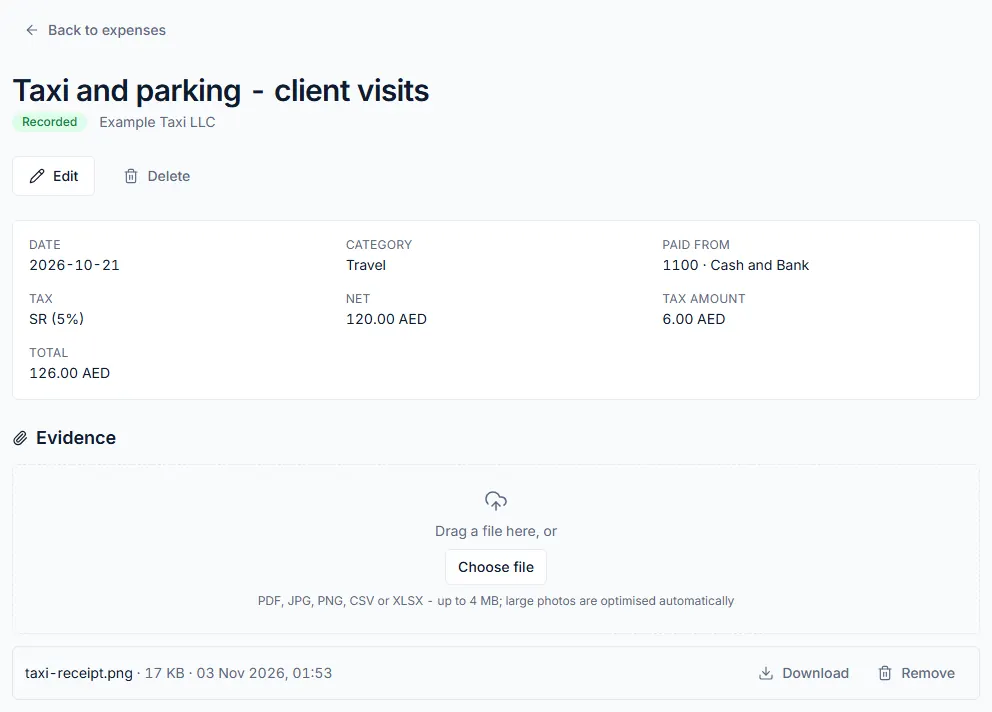
- Under Evidence, click Choose file and attach the receipt.
- Click Record. The status changes to Recorded.
What the "Paid from" list shows
- Each bank account you added under Banking, shown by its name, bank, last four digits and currency.
- Each cash or bank ledger account that has no bank account record, shown as its code and name, for example a petty cash account.
- Only accounts in the expense's currency. For a foreign-currency expense, accounts in your company's base currency are listed too.
- If there is only one account you can use, it is chosen for you.
- When the field is optional, you can leave it on Cash and Bank (general). When it is required, the empty choice reads Choose the cash or bank account that paid this expense… and you must pick one.
What happens next
- A recorded expense is posted to your books: the cost goes to the account you chose, and the money comes out of the Paid from account.
- The expense page shows the Paid from account, the Net, the Tax amount and the Total.
- When you import your bank statement, the bank line for this payment can be matched to the expense. See Import a bank statement and reconcile.
- A recorded expense is not changed in place. Edit voids it and opens a copy for you to correct.
Common mistake
Leaving Paid from on Cash and Bank (general) when you have a bank account set up. The money then comes out of the general cash and bank account, and unless your bank account posts to that same account, the payment will not show on the bank's side when you reconcile. Choose the exact bank or cash account that paid.
Related
Last updated: 3 November 2026