
Bank accounts
3-minute read · Last updated 3 November 2026
Add each bank account your company uses, link it to its own ledger account, and set the opening balance for reconciliation.
Before you start
- To add a bank account, your role must allow you to manage banking. The Owner, Admin and Accountant roles can. A role that can only view banking sees the screen without the add form.
- To create a new ledger account for the bank, your role must also allow you to manage the chart of accounts.
- Have the bank's name, the last four digits of the account number, the currency, and the balance on your bank statement on the day you start.
Steps
Create a ledger account for the bank (recommended)
Each bank account in RTS Book posts to a ledger account in your chart of accounts. A new company already has 1100 Cash and Bank and 1110 Petty Cash. If you have more than one bank account, give each its own ledger account.
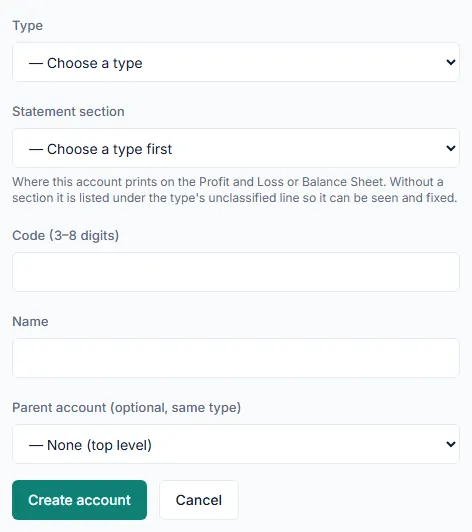
- Go to Accounting › Chart of Accounts.
- Click New account.
- In Type, choose ASSET.
- In Statement section, choose Balance Sheet › Assets › Current Assets › Cash and Cash Equivalents › Bank (BANK).
- Keep the proposed Code (3–8 digits), or type your own.
- Type a Name, for example "Business current account".
- Click Create account.
Add the bank account
- Go to Banking › Banking.
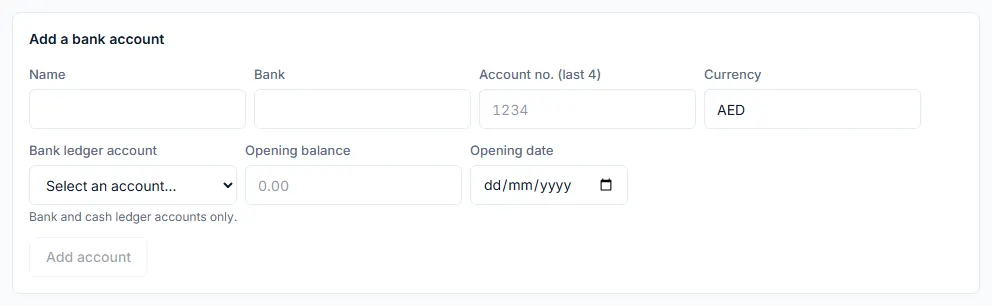
- In Add a bank account, type a Name you will recognise, for example "Main AED account".
- Type the Bank name.
- Type the Account no. (last 4). Only the last four digits are kept, never the full account number.
- Type the 3-letter Currency code, for example AED.
- In Bank ledger account, choose the ledger account this bank posts to. Only bank and cash ledger accounts are listed.
- In Opening balance, type the balance shown on your bank statement on your start date.
- Enter that start date in Opening date.
- Click Add account.
What happens next
- The account appears under Bank accounts and their ledger accounts, with the ledger account it posts to.
- It is offered in Paid from on expenses and payments, and in the Bank account list for statement imports.
- The opening balance is the starting point of the statement side of the reconciliation. It does not post anything to your books.
- To move a bank account to a different ledger account, click Relink beside it and choose the new account. Past postings stay where they are; new payments post to the new account. Relink is refused while the bank account has matched lines.
Common mistake
Adding a sub-account under 1100 Cash and Bank turns 1100 into a group account, and a group account can take no payments. Any bank account that still posts to 1100 is then flagged with Linked to a group account: no payment can move through it. Click Relink on that bank account and choose the bank's own ledger account.
Related
Last updated: 3 November 2026