
Give your accountant or accounting firm access
2-minute read · Last updated 3 November 2026
Invite your own accountant as a user, or approve an accounting firm's request to work in your books. You can remove access at any time.
Before you start
- You need the Owner or Admin role. Firm Access appears in the menu only for a role that can assign roles.
- Choose the right way. Invite an individual accountant as a user when they do not have an RTS Book account yet. Use Firm Access when an accounting firm that already works in RTS Book asks for access.
- Read Invite users and set their roles if you have not invited anyone before.
Steps
Invite an individual accountant
- Go to Settings › Users.
- Click Invite user.
- In Email, type your accountant's email address.
- In Role, choose Accountant.
- Click Send invitation.
Approve an accounting firm's request
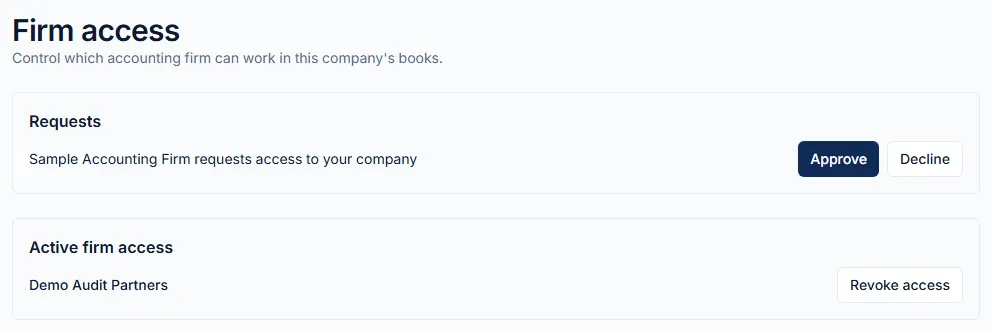
- Go to Settings › Firm Access. The page Firm access opens.
- Under Requests, find the line that says the firm requests access to your company.
- Click Approve to give the firm access, or Decline to refuse it.
Remove a firm's access
- On Firm access, find the firm under Active firm access.
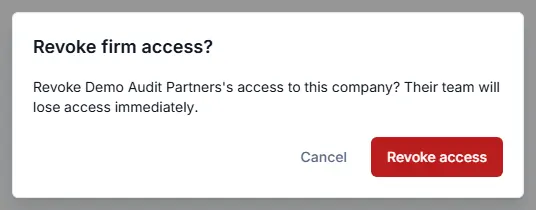
- Click Revoke access.
- In the Revoke firm access? box, click Revoke access.
What happens next
- Your accountant, or the firm's team member, works in your company with the Accountant role. They can work on the books, VAT and reports. They cannot invite users or change billing.
- Payroll is not included. To share payroll, click Payroll access on the person's row in Settings › Users.
- Once the firm has access, it sees your company in its own list of client companies and opens your books from there.
- When you revoke a firm's access, its team loses access immediately. Everything they recorded stays in your books.
- To remove an individual accountant, use Remove from company on their row in Settings › Users.
Common mistake
Do not invite an accountant by email if that email address already has an RTS Book account, for example in their firm's own workspace. One email address belongs to one workspace, so they cannot accept the invitation. Invite another email address they use, or write to us at support@rtsbc.ae to connect their firm's workspace to your company.
Related
Last updated: 3 November 2026